Building autonomous AI agents is an exciting frontier in software development. The idea of an agent that can not only write content but also generate its own imagery and publish a complete article is incredibly powerful. However, as with any complex system involving multiple services—a language model, an image generator, a database, and a web framework—the potential for subtle, frustrating bugs is high.
This is the story of one such bug: a “case of the vanishing images” that plagued our AI agent, and the step-by-step diagnostic process that led to its resolution.
The Problem Statement: A Ghost in the Machine
The project was an AI agent built with LangGraph and Google’s Gemini models, designed to perform the following workflow:
- Receive a topic.
- Write an article using Gemini 2.5 Pro.
- Critique its own work.
- Generate images for the article based on
[IMAGE: description]placeholders. - Upload the final HTML and images to a WordPress site.
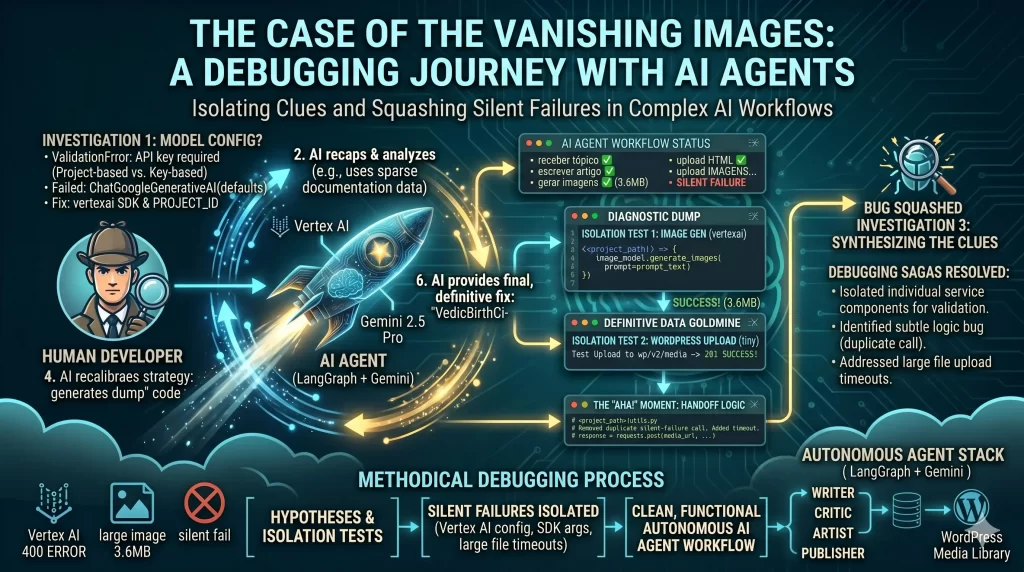
The agent would run without crashing. It would log messages like “Generating image…” and “Uploading to WordPress…” and finally report “Post Created!”. But when viewing the post in WordPress, the images were either missing entirely or replaced by fallback placeholders. There were no obvious errors, just a silent failure that left us with a frustrating question: where did the images go?
The Investigation: Following the Clues
When faced with a silent failure in a distributed system, the key is to isolate and test each component individually. We treated it like a detective case, forming and testing hypotheses one by one.
Hypothesis 1: Is the AI Model Configuration Correct?
The first suspect is always configuration and authentication. Initially, the application wouldn’t even start, throwing a ValidationError.
textpydantic_core._pydantic_core.ValidationError: 1 validation error for ChatGoogleGenerativeAI
  Value error, API key required for Gemini Developer API. Provide api_key parameter or set GOOGLE_API_KEY/GEMINI_API_KEY environment variable.
This error was a clear signal. The ChatGoogleGenerativeAI library can operate in two modes: one for the public Gemini Developer API (which uses a simple API key) and another for Google Cloud’s Vertex AI (which uses project-based authentication). Our setup used Vertex AI, but we hadn’t told the library that.
The Fix: We needed to explicitly pass the project ID during model initialization.
Failed Code:
python# <project_path>\config.py
# This defaults to the Developer API, causing the error.
llm_writer = ChatGoogleGenerativeAI(
    model="gemini-2.5-pro",
    temperature=0.7
)
Solution:
python# <project_path>\config.py
# Explicitly telling the model to use our Vertex AI project.
llm_writer = ChatGoogleGenerativeAI(
    model="gemini-2.5-pro",
    project=os.getenv("GOOGLE_PROJECT_ID"), # <-- The Fix
    temperature=0.7
)
With that solved, the agent could run. But the images were still missing.
Hypothesis 2: Is Image Generation Failing?
The next logical step was to test image generation in complete isolation. We created a simple script, test_image.py, to do nothing but connect to Vertex AI and generate a single image. This led to our next set of clues.
First, an ImportError showed that the third-party library we were using (langchain_community) was unstable or had changed. Rather than debug the wrapper, we pivoted to a more robust solution: using the official vertexai SDK directly.
This led to a new, more informative error from the Google Cloud API itself.
text❌ FAILED: 400 Missing text content.
This 400 error meant we were successfully connecting and authenticating, but the data we were sending was not in the format the API expected. A quick look at the SDK documentation revealed the issue.
Failed Code:
python# <project_path>\agent.py
# The generate_images method expects a string, not a list of strings.
response = image_model.generate_images(prompt=[prompt_text])
Solution:
python# <project_path>\agent.py
# Passing the prompt directly as a string.
response = image_model.generate_images(prompt=prompt_text)
After fixing the argument type, we ran test_image.py again. This time, we got the breakthrough we were looking for.
text🎨 Attempting to generate an image...
✅ SUCCESS! Image Generated (3671114 bytes).
This was a critical milestone. We had definitive proof that our credentials were correct and that we could successfully generate a full-sized, multi-megabyte image from the service. The problem wasn’t with image generation.
Hypothesis 3: Is the WordPress Upload Failing?
With generation confirmed, suspicion fell on the WordPress upload process. We created another targeted test script, test_upload.py, that did nothing but attempt to upload a tiny, 1-pixel dummy image to the WordPress media endpoint.
The result was surprising and crucial.
text📡 Testing Media Upload to: http://wordpress/wp-json/wp/v2/media
🔄 HTTP Status Code: 201
✅ SUCCESS! Image Uploaded.
This test proved that the network connection between our agent and WordPress was fine, the API endpoint was correct, and our authentication credentials were valid.
The “Aha!” Moment: Synthesizing the Clues
We now had two seemingly contradictory facts:
- Image generation works.
- Image upload works.
So why was the combined process failing? The only remaining place for the bug to hide was in the “handoff” code—the function responsible for taking the generated image data and sending it to WordPress.
The key difference between our successful test and the failing agent was the file size. The test_upload.py script sent a tiny, sub-kilobyte file, while the artist_node was trying to upload a large, 3.6MB image. Large HTTP uploads can be slow, and network libraries often have default timeouts.
Reviewing the utils.py file revealed the culprit—a subtle but fatal logic bug.
Failed Code:
python# <project_path>\utils.py
def upload_image_to_wp(image_path_or_url: str, caption: str):
    # ...
    print(f"   ⬆️ Uploading to {media_url}...")
    # This first request had no timeout. It was likely failing silently
    # with the large image file, but the code would continue.
    response = requests.post(media_url, headers=headers, data=image_data)

    # This second, duplicate request was added during debugging and had a timeout,
    # but the code never reached it if the first one failed.
    response = requests.post(media_url, headers=headers, data=image_data, timeout=30)

    if response.status_code == 201:
        # ...
The code was making the same upload request twice! The first call had no timeout parameter, causing it to fail silently on the large file. The second, correct call was never executed properly.
The Final Solution
The fix was simple: remove the duplicate line and ensure the single, correct requests.post call included a generous timeout to handle large file uploads.
utils.py-1+0The code change produced by Gemini cannot be automatically applied. You can manually apply the change or ask Gemini to try again.            "Content-Type": content_type # Use the determined content type
        }
        print(f"   ⬆️ Uploading to {media_url}...")
        response = requests.post(media_url, headers=headers, data=image_data)
        response = requests.post(media_url, headers=headers, data=image_data, timeout=30)

        if response.status_code == 201:
            media_data = response.json()
With this one-line change, the entire workflow snapped into place. The agent now runs flawlessly, generating beautiful images and embedding them correctly in the final WordPress post.
This debugging journey is a classic example of how complex systems can fail in non-obvious ways. By maintaining a methodical, hypothesis-driven approach and using targeted test scripts to isolate each component, we were able to turn a frustrating “it just doesn’t work” problem into a clear, solvable bug.
Previous Article in this series: The Developer’s Crucible: Debugging, Patience, and the AI Partnership
You may directly jump to other parts in this series:
Part 1: From Idea to Architecture: Building a Scalable API with an AI Co-pilot
Part 2: Deploy Anywhere: A Guide to Cloud-Agnostic, Serverless APIs
You may like to view other series of 4 part blogs on Building Autonomous AI Agents here.
Enjoyed this article?
Get notified when the next one is published.
We send one email per new article — no spam, unsubscribe any time.
⚠️ Disclaimer: The information provided on LearnWithNeeraj.com regarding Astrology, Numerology, and other topics is for educational and guidance purposes only.
Not Professional Advice: This content should not be used as a substitute for professional medical, legal, or financial advice. Always consult a certified professional for specific concerns.
Guest Authors: This site features articles by various contributors. The views and interpretations expressed are those of the individual authors and do not necessarily reflect the views of the website administrator.
Your destiny is in your hands. Use this information as a map, not a mandate.