TL;DR
This article covers the deployment of our API, focusing on achieving true cloud-agnosticism and infinite scalability. We detail our use of the Serverless Framework to define our infrastructure as code, allowing for one-command deployments to any cloud provider. We also explore how Docker was used to create a high-fidelity local testing environment. Throughout, we highlight how an AI coding assistant acted as a DevOps expert, generating complex configuration files and accelerating our journey from localhost to a live, auto-scaling cloud application.
The Deployment Dilemma: Servers vs. Serverless
In our last article, we architected a clean, scalable microservices application. Now, we face the classic developer challenge: deployment. The traditional path involves provisioning a virtual server, patching the OS, installing a web server like Nginx, configuring a process manager like Gunicorn, and setting up deployment scripts. This process is tedious, error-prone, and requires constant maintenance.
We chose a different path. Our goal was to build a system that could run anywhere and manage itself. This led us to two key technologies: Docker for local testing and the Serverless Framework for cloud deployment. Our AI co-pilot was instrumental in mastering both.
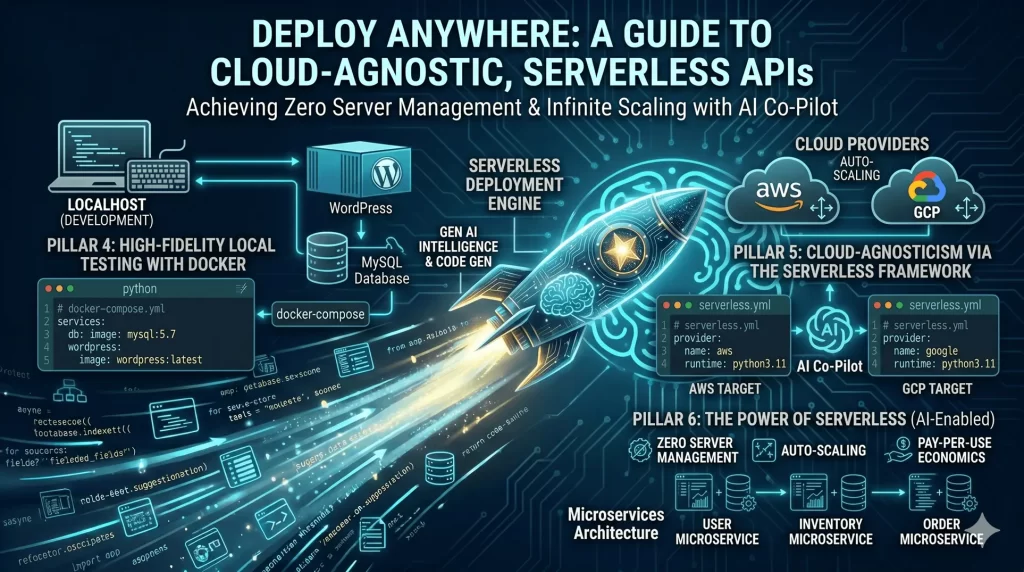
Architectural Pillar #4: High-Fidelity Local Testing with Docker (AI-Configured)
The infamous “it works on my machine” problem plagues development teams. To avoid it, our local environment needed to mimic production as closely as possible. Our API needs to be called by a frontend, so we needed a frontend to test against.
Instead of installing WordPress, MySQL, and PHP directly on our development machines, we asked our AI assistant to containerize the frontend. It generated a complete docker-compose.yml file in seconds. Please don’t rely blindly on the generated output. My strong recommendation is to thoroughly validate the version of the image, ports etc.
yaml# <project_path>\docker-compose.yml
version: '3.8'

services:
  db:
    image: mysql:5.7
    volumes:
      - db_data:/var/lib/mysql
    restart: always
    environment:
      MYSQL_ROOT_PASSWORD: somerootpassword
      # ... other db config

  wordpress:
    image: wordpress:latest
    ports:
      - "8000:80" # Access the test site via http://localhost:8000
    restart: always
    environment:
      WORDPRESS_DB_HOST: db:3306
      # ... other wordpress config

volumes:
  db_data:
With a single command (docker-compose up -d), we can spin up a fully functional, isolated WordPress environment (this can be any docker image. I have given example as I has been using wordpress on my laptop for my personal stuff). This allows us to test the entire request-response cycle, from a button click in a browser on the WordPress container to the JSON response from our Python API running on the host machine. The AI acted as a DevOps engineer, providing a production-grade testing setup without us needing to be Docker experts.
Architectural Pillar #5: Cloud-Agnosticism via the Serverless Framework (AI-Generated)
One of the biggest strategic risks in cloud development is vendor lock-in. Building an application that relies too heavily on one provider’s specific services (like AWS Lambda’s specific event format) can make it incredibly difficult and expensive to migrate to another provider later.
Our solution was to use the Serverless Framework as an abstraction layer. This powerful tool lets us define our cloud infrastructure in a universal serverless.yml file. We describe what we want, and the framework translates it into the specific resources for our chosen cloud provider.
We asked our AI assistant to generate the configuration for Google Cloud Platform (GCP).
yaml# <project_path>\serverless.yml

service: data-processing-api
frameworkVersion: "3"

provider:
  name: google
  runtime: python3.11
  project: your-gcp-project-id # Our GCP project ID

functions:
  api:
    # The 'app' object in our Flask main.py is the entry point
    handler: app
    events:
      # Create a public HTTP endpoint for our function
      - http: true

plugins:
  # The plugin that enables GCP deployment
  - serverless-google-cloudfunctions
This file is our golden ticket to cloud freedom. If we ever decide to move to AWS, we would ask the AI to generate a new provider section targeting aws. Our core application code—the Python files containing our business logic—would require zero changes. This is the practical definition of a cloud-agnostic architecture.
Architectural Pillar #6: The Power of Serverless (AI-Enabled)
By deploying to a “serverless function” (like Google Cloud Functions or AWS Lambda), we effectively outsourced all our server management tasks. This strategic choice, recommended and implemented by our AI partner, provides incredible benefits:
- Zero Server Management: No more patching, configuring, or monitoring virtual machines.
- Auto-Scaling: If our API gets a sudden spike in traffic, the cloud provider automatically creates more instances to handle the load. When the traffic subsides, the instances disappear.
- Pay-Per-Use Economics: This is the most compelling part. We are only billed for the milliseconds our code is actually running. For an API that might be idle for long periods, this is vastly cheaper than paying for a server to run 24/7.
The AI’s role here was transformative. Writing YAML configuration files is a notoriously tedious and error-prone process. A single misplaced space can lead to hours of debugging. The AI generated a good to start with, syntactically correct docker-compose.yml and serverless.yml files instantly. This saved us many hours of configuration and debugging, allowing us to focus entirely on our application’s features.
In our next article, we’ll get real. Our architecture is modern and our deployment is automated, but the path was not without its bumps. We’ll dive into the messy, frustrating, and ultimately rewarding world of debugging, and show how the human-AI partnership shines brightest when things go wrong.
Previous/ First Article in this series: From Idea to Architecture: Building a Scalable API with an AI Co-pilot
You may directly jump to other parts in this series:
Part 4: The Case of the Vanishing Images: A Debugging Journey with AI Agents and WordPress
You may like to view other series of 4 part blogs on Building Autonomous AI Agents here.
Enjoyed this article?
Get notified when the next one is published.
We send one email per new article — no spam, unsubscribe any time.
⚠️ Disclaimer: The information provided on LearnWithNeeraj.com regarding Astrology, Numerology, and other topics is for educational and guidance purposes only.
Not Professional Advice: This content should not be used as a substitute for professional medical, legal, or financial advice. Always consult a certified professional for specific concerns.
Guest Authors: This site features articles by various contributors. The views and interpretations expressed are those of the individual authors and do not necessarily reflect the views of the website administrator.
Your destiny is in your hands. Use this information as a map, not a mandate.