TL;DR
This article reveals the unglamorous but critical reality of software development: debugging. We recount the real-world challenges faced, from frustrating environment setup errors to a cryptic bug deep within a third-party library. We showcase how the iterative, conversational partnership with an AI coding assistant transformed these roadblocks. Instead of being a source of frustration, each bug became a data point, allowing the AI to refine its approach and guide us to the correct solution, turning a potentially week-long debugging saga into a focused, collaborative, and educational process.
The Unspoken Truth of Software Development
In the first two parts (Part 1, Part 2) of this series, we designed a microservice based architecture and automated our cloud deployment. It’s easy to look at the final result and think it was a smooth, linear process. It wasn’t.
The unspoken truth of a software developer’s life is that they spend far more time debugging code than writing it. This article is about the crucible of development: the frustrating, confusing, and ultimately rewarding process of hunting down and fixing bugs. It’s here that the partnership between a human developer and an AI assistant truly shows its power. The next article highlights “A Debugging Journey with AI Agents and WordPress“
The First Hurdle: The Chaos of Environment Setup
Before we could even run our code, we hit a wall. We chose Conda to manage our Python environment, a standard practice. But our initial attempt to create the environment failed.
CondaValueError: prefix already exists: C:\Users\...\..
This is a common but annoying issue where a failed installation leaves behind a corrupted folder. A quick query to our AI assistant gave us the immediate, correct two-step solution:
conda env remove --name learnwithneeraj_apis(to forcefully delete the broken environment)conda env create -f environment.yml(to try again with a clean slate)
Next, another error: ERROR: No matching distribution found for a-specific-data-library==0.0.5
Again, a common “dependency hell” problem. The AI explained that the version we specified didn’t exist and provided the available versions from the package repository. We updated the version number in our environment.yml, and the installation succeeded.
Individually, these are minor issues. But for a developer, they can add up to an hour or more of frustrating searching on Stack Overflow. With the AI, it was a quick and conversational process. The AI acted as an expert who had seen these exact errors hundreds of times before.
The Real Challenge: Debugging a Third-Party Black Box
Our most significant challenge came from a specialized data processing library. Our code, which seemed logically correct, kept crashing with a cryptic error:
AttributeError: 'VedicBirthChart' object has no attribute 'moon'
We knew the data we needed was somewhere inside that object, but the library’s documentation was sparse. We were flying blind. This is where the iterative human-AI partnership became essential. This is what I’ve highlighted in other articles on this series.
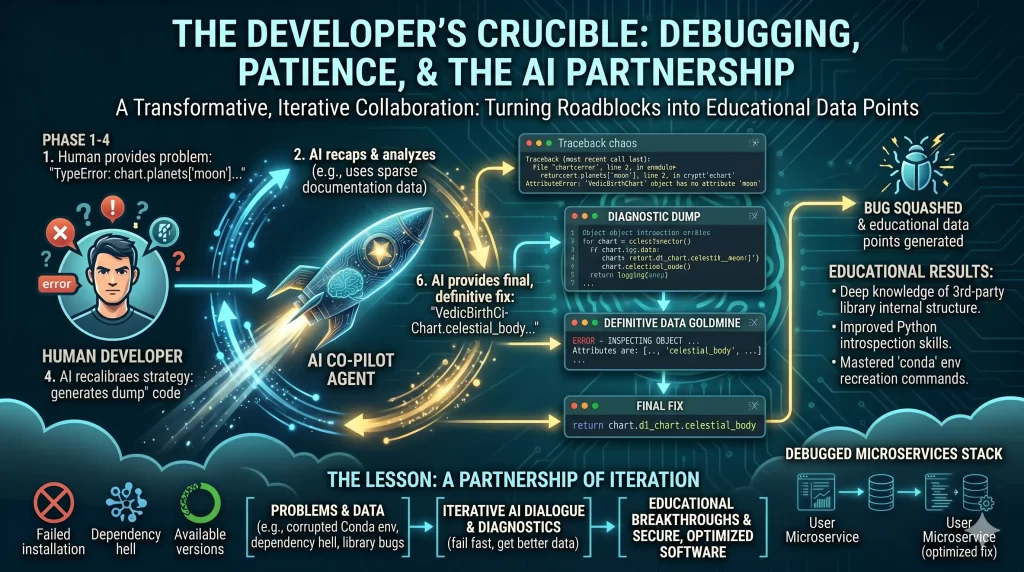
Phase 1: The Educated Guess (and Failure) Our AI partner, based on common Python design patterns, made an educated guess.
AI: “The error suggests you can’t access .moon directly. Let’s try accessing it from a planets dictionary, like chart.planets['moon'].”
We implemented the change. It failed with the same error. The AI’s first guess was wrong. This is a critical point: the AI is not an oracle. It’s a tool that, like a human, sometimes needs more data.
Phase 2: The Human’s Role – Providing New Data The developer’s role was now clear: provide the AI with better data. We ran the code again and pasted the exact error log back into the chat.
Developer: “That didn’t work. Here is the new traceback…”
Phase 3: The Breakthrough – A Shift in Strategy The AI analyzed the new (but still unhelpful) traceback and changed its strategy.
AI: “You are right to be frustrated. Our guessing is not working. We need to stop trying to fix the bug and start trying to understand it. I will modify the code to perform a ‘diagnostic dump’. It will inspect the object and log its exact structure to the console before crashing.”
This was the turning point. The AI generated this temporary diagnostic code:
python# A temporary, diagnostic change in our calculation_engine.py
# ... inside a function
if self.chart.d1_chart.planets:
    first_planet_object = self.chart.d1_chart.planets[0]
    # Log the available attributes of the object to the console
    logging.error(f"INSPECTING OBJECT: {dir(first_planet_object)}")

# Intentionally stop execution so we can check the logs
raise AttributeError("Stopping to inspect logs.")
We ran the code one last time. The terminal produced the golden ticket:
ERROR - INSPECTING OBJECT ... Available attributes are: [..., 'celestial_body', ..., 'nakshatra', ..., 'sign', ...]
The answer was right there. The attribute we needed wasn’t name or planet—it was celestial_body.
Phase 4: The Definitive Fix With this concrete evidence, the final fix was no longer a guess; it was a certainty. The AI rewrote the logic to use the correct attribute, and the bug was finally squashed.
The Lesson: A Partnership of Iteration
This debugging saga, which could have easily consumed a developer for days, was resolved in under couple of hours (though this consumed significant tokens etc.). The key was the iterative loop:
- Human provides the initial problem.
- AI provides a potential solution.
- The solution fails, but produces a new data point (the error log).
- Human feeds this new data back to the AI.
- AI recalibrates and proposes a better strategy (diagnostics).
- The strategy produces definitive data.
- AI provides the final, correct solution.
This is the future of software development: a powerful, conversational partnership where the developer’s insight and the AI’s speed and knowledge combine to solve problems with unprecedented efficiency.
Next Steps for the Project
Our API is now working, robustly architected, and deployed on a scalable cloud platform. The journey continues, and our next steps, guided by our AI partner, include:
- Frontend Integration: Building out the WordPress integration to display the API results and handle the PDF downloads.
- Production Hardening: Implementing a full CI/CD pipeline with GitHub Actions for automated testing and deployment.
- New Microservices: Leveraging our
data-processing-apias a template to rapidly build new features, confident that our foundation is built to last.
Previous Article in this series: Deploy Anywhere: A Guide to Cloud-Agnostic, Serverless APIs
You may directly jump to other parts in this series:
Part 1: From Idea to Architecture: Building a Scalable API with an AI Co-pilot
Part 4: The Case of the Vanishing Images: A Debugging Journey with AI Agents and WordPress
You may like to view other series of 4 part blogs on Building Autonomous AI Agents here.
Enjoyed this article?
Get notified when the next one is published.
We send one email per new article — no spam, unsubscribe any time.
⚠️ Disclaimer: The information provided on LearnWithNeeraj.com regarding Astrology, Numerology, and other topics is for educational and guidance purposes only.
Not Professional Advice: This content should not be used as a substitute for professional medical, legal, or financial advice. Always consult a certified professional for specific concerns.
Guest Authors: This site features articles by various contributors. The views and interpretations expressed are those of the individual authors and do not necessarily reflect the views of the website administrator.
Your destiny is in your hands. Use this information as a map, not a mandate.