📌 TL;DR
Moving an agentic data platform from local Docker Compose to production Kubernetes deployment requires Infrastructure as Code, careful secrets management, health-check-driven readiness, and scaling logic that accounts for the statefulness of agent workflows. This article covers the full deployment stack: multi-stage Dockerfiles, Kubernetes manifests, Terraform for infrastructure provisioning, and how the platform’s Prometheus metrics feed back into Kubernetes’ Horizontal Pod Autoscaler to create a self-scaling system.
⏮️ Previous: Part 8 — Documentation as Code: Making Your Agentic Platform Self-Describing → | ⏭️ Next: Part 10 — Testing the Untestable: Strategies for Agentic System Validation →
📖 Series context: In Part 8 — Documentation as Code, we established the four-layer documentation strategy — docstrings, ADRs, YAML data dictionaries, and OpenMetadata — that makes the platform self-describing for both humans and agents. Now we ship it: this article takes that documented, tested codebase and deploys it to production Kubernetes with full Infrastructure as Code, zero-downtime rolling updates, and Kafka-lag-driven autoscaling. In Part 10 — Testing the Untestable, we return to quality assurance with a testing strategy purpose-built for probabilistic, distributed agentic systems.
💡 Quick stats: 🐳 40–60% smaller production images with multi-stage Docker builds · ☸️ 2→10 replicas autoscaled by Kafka consumer lag · 🔒 0 secrets in version control — all injected at deploy time · ♻️ 0 downtime deployments with maxUnavailable: 0 rolling update strategy
🌉 The Gap Between Development and Production
If you are a data engineer or platform architect taking an agentic pipeline from a working Docker Compose environment to production — this section addresses the four requirements Docker Compose cannot satisfy. By the end, you will have the exact Kubernetes, Terraform, and HPA patterns needed to run a stateful, governance-enforced agentic pipeline in production without downtime or manual scaling intervention.
Docker Compose gets the development environment right, but production has requirements that Docker Compose cannot satisfy: high availability (replicated services, automatic restart on failure), horizontal scaling (adding compute when load increases), secrets management (rotating credentials without restarting services), and rolling deployments (updating services without downtime).
Kubernetes provides all of these. But moving from Docker Compose to Kubernetes is not just a format translation — it requires rethinking how the application is configured, how it handles failure, and how it communicates with other services.
The migration principles that guide the work here come directly from 12-Factor App methodology:
- Principle VI (Processes): Application processes must be stateless. State lives in backing services (PostgreSQL, MinIO, Redis).
- Principle IX (Disposability): Processes must start quickly and shut down gracefully. A pipeline pod killed by Kubernetes (for scaling down or node eviction) must not corrupt in-flight data.
- Principle XI (Logs): Applications must not manage log files. They write to stdout/stderr; the Kubernetes logging infrastructure captures and ships them.
💡 Pro tip: The 12-Factor App principles were written for web applications but apply directly to data pipelines. The single most impactful principle for agentic workloads is Disposability (IX): a pipeline pod that cannot complete its shutdown gracefully will corrupt in-flight agent state stored in LangGraph checkpoints. Design for disposability before you need it.
↑ Back to top · Next: Containerisation →
🐳 Containerisation
Each application component has its own Dockerfile following a multi-stage build pattern that keeps the production image lean — build tools stay in the builder stage and are never copied to the runtime image, reducing image size by 40–60%:
# Build stage — compile dependencies in a larger image
FROM python:3.11-slim AS builder
WORKDIR /app
COPY requirements.txt .
RUN pip install --no-cache-dir --user -r requirements.txt

# Runtime stage — copy only what is needed
FROM python:3.11-slim
WORKDIR /app
COPY --from=builder /root/.local /root/.local
COPY libs/ libs/
COPY apps/pipeline/ apps/pipeline/
COPY schema/ schema/

ENV PATH=/root/.local/bin:$PATH
ENV PYTHONUNBUFFERED=1
ENV PYTHONDONTWRITEBYTECODE=1

HEALTHCHECK --interval=30s --timeout=10s --start-period=5s --retries=3 \
    CMD python -c "from libs.common.database import is_database_available; exit(0 if is_database_available() else 1)"

CMD ["python", "-m", "apps.pipeline.main"]
The multi-stage build keeps the production image lean — the build tools (gcc, pip’s build backend) stay in the builder stage and are not copied to the final image. For a data pipeline application, this typically reduces image size by 40–60%.
PYTHONUNBUFFERED=1 ensures Python output is written to stdout immediately rather than buffered — critical for log shipping to work correctly in Kubernetes.
↑ Back to top · Next: Kubernetes Manifests →
☸️ Kubernetes Manifests
📋 Deployment
apiVersion: apps/v1
kind: Deployment
metadata:
  name: pipeline
  namespace: agentic-pfm
spec:
  replicas: 2
  selector:
    matchLabels:
      app: pipeline
  strategy:
    type: RollingUpdate
    rollingUpdate:
      maxUnavailable: 0
      maxSurge: 1
  template:
    metadata:
      labels:
        app: pipeline
      annotations:
        prometheus.io/scrape: "true"
        prometheus.io/port: "8000"
        prometheus.io/path: "/metrics"
    spec:
      containers:
        - name: pipeline
          image: agentic-pfm/pipeline:latest
          ports:
            - containerPort: 8000
          envFrom:
            - secretRef:
                name: pipeline-secrets
            - configMapRef:
                name: pipeline-config
          readinessProbe:
            httpGet:
              path: /health
              port: 8000
            initialDelaySeconds: 10
            periodSeconds: 5
            failureThreshold: 3
          livenessProbe:
            httpGet:
              path: /health
              port: 8000
            initialDelaySeconds: 30
            periodSeconds: 10
            failureThreshold: 3
          resources:
            requests:
              cpu: "250m"
              memory: "512Mi"
            limits:
              cpu: "1000m"
              memory: "2Gi"
A few production-critical settings worth calling out:
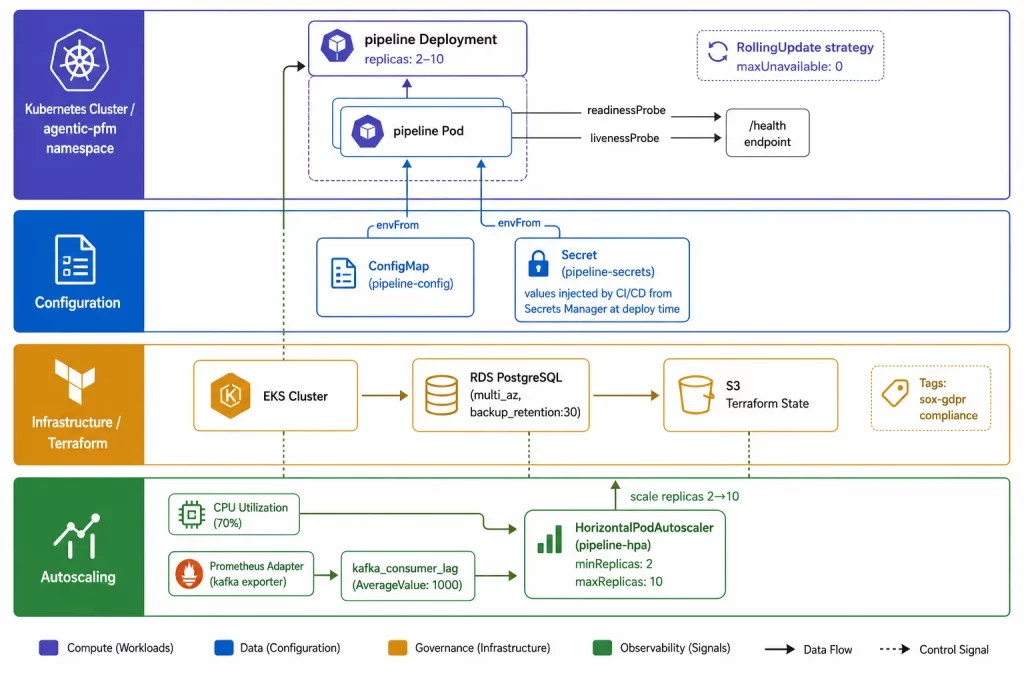
maxUnavailable: 0 in the rolling update strategy ensures zero-downtime deployments. Kubernetes will not remove an old pod until the new pod has passed its readiness probe, guaranteeing that at least replicas pods are serving traffic at all times.
Prometheus annotations on the pod template tell the Prometheus Kubernetes SD (service discovery) to scrape metrics from this pod without requiring a separate ServiceMonitor resource.
Resource limits are required for cluster stability. A pipeline pod that leaks memory and grows unboundedly will eventually be evicted and restarted by Kubernetes. The limits here are conservative starting points; they should be adjusted based on actual memory consumption measurements.
🔐 ConfigMap and Secrets
apiVersion: v1
kind: ConfigMap
metadata:
  name: pipeline-config
  namespace: agentic-pfm
data:
  KAFKA_TOPIC: "agentic-transactions"
  ENABLE_KAFKA_PUBLISH: "true"
  ENABLE_S3_LAKEHOUSE_EXPORT: "false"
  BATCH_SIZE: "100"
  OPA_POLICY_PATH: "agentic/allow"
  LOG_LEVEL: "INFO"
---
apiVersion: v1
kind: Secret
metadata:
  name: pipeline-secrets
  namespace: agentic-pfm
type: Opaque
stringData:
  DB_PASSWORD: ""         # Set by CI/CD from secrets manager
  MINIO_ROOT_PASSWORD: "" # Set by CI/CD from secrets manager
  ENCRYPTION_KEY: ""      # Set by CI/CD from secrets manager
Non-sensitive configuration goes in the ConfigMap. Sensitive values (passwords, API keys, encryption keys) go in Kubernetes Secrets. In production, the Secret values are never committed to version control — they are injected by the CI/CD pipeline from a secrets manager (AWS Secrets Manager, HashiCorp Vault, Azure Key Vault, or equivalent) at deployment time.
The application code reads all configuration from environment variables — it is completely agnostic to whether the values came from a .env file, a ConfigMap, or a Secret.
↑ Back to top · Next: Infrastructure Provisioning with Terraform →
🏗️ Infrastructure Provisioning with Terraform
The cloud infrastructure supporting the Kubernetes cluster is defined as code using Terraform. This makes the entire infrastructure reproducible, auditable, and version-controlled — the same review process that applies to application code applies to infrastructure changes.
# infrastructure/main.tf

terraform {
  required_version = ">= 1.5"
  required_providers {
    aws = {
      source  = "hashicorp/aws"
      version = "~> 5.0"
    }
  }
  backend "s3" {
    bucket = "agentic-pfm-terraform-state"
    key    = "production/terraform.tfstate"
    region = "us-east-1"
  }
}

module "eks_cluster" {
  source  = "terraform-aws-modules/eks/aws"
  version = "~> 20.0"

  cluster_name    = "agentic-pfm-${var.environment}"
  cluster_version = "1.30"
  vpc_id          = module.vpc.vpc_id
  subnet_ids      = module.vpc.private_subnets

  eks_managed_node_groups = {
    pipeline = {
      min_size     = 2
      max_size     = 10
      desired_size = 3

      instance_types = ["m5.xlarge"]
      capacity_type  = "ON_DEMAND"

      labels = {
        workload = "pipeline"
      }
    }
  }

  tags = {
    Environment = var.environment
    ManagedBy   = "terraform"
    Project     = "agentic-pfm"
    Compliance  = "sox-gdpr"
  }
}

module "rds_postgres" {
  source  = "terraform-aws-modules/rds/aws"
  version = "~> 6.0"

  identifier = "agentic-pfm-${var.environment}"
  engine     = "postgres"
  engine_version = "15"
  instance_class = "db.t3.medium"

  allocated_storage     = 100
  max_allocated_storage = 500

  db_name  = "agentic_pfm"
  username = "pipeline_user"
  password = var.db_password  # Injected from secrets manager

  multi_az               = var.environment == "production"
  deletion_protection    = var.environment == "production"
  backup_retention_period = 30  # 30-day backup retention for SOX compliance

  tags = {
    Environment = var.environment
    ManagedBy   = "terraform"
    DataClass   = "financial"
  }
}
The backup_retention_period = 30 setting on RDS is a compliance requirement, not a preference. SOX Section 802 requires a minimum record retention period for financial records; 30 days for database backups provides the point-in-time recovery capability that SOX auditors expect.
The multi_az = var.environment == "production" pattern demonstrates environment-aware infrastructure: multi-AZ is enabled in production (high availability) but not in staging or development (cost saving). The same Terraform code handles all environments through variable differences.
↑ Back to top · Next: Horizontal Pod Autoscaling →
📈 Horizontal Pod Autoscaling
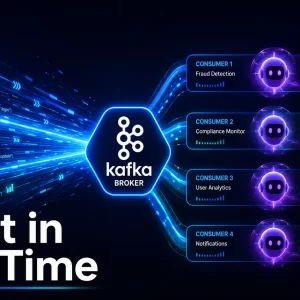
The platform uses Kubernetes’ Horizontal Pod Autoscaler (HPA) to scale pipeline replicas automatically — not just on CPU, but on Kafka consumer lag from the streaming layer built in Part 7, which is the metric that actually reflects pipeline backpressure:
apiVersion: autoscaling/v2
kind: HorizontalPodAutoscaler
metadata:
  name: pipeline-hpa
  namespace: agentic-pfm
spec:
  scaleTargetRef:
    apiVersion: apps/v1
    kind: Deployment
    name: pipeline
  minReplicas: 2
  maxReplicas: 10
  metrics:
    - type: Resource
      resource:
        name: cpu
        target:
          type: Utilization
          averageUtilization: 70
    - type: Pods
      pods:
        metric:
          name: kafka_consumer_lag
        target:
          type: AverageValue
          averageValue: "1000"
The HPA scales on two metrics: CPU utilisation (standard) and Kafka consumer lag (custom). Consumer lag scaling is the intelligence layer — when the Kafka topic backs up because the pipeline is processing messages more slowly than they arrive, the HPA adds pipeline pods to reduce lag.
This Kafka-lag-based scaling requires the kube-prometheus-stack with a Prometheus Adapter that exposes custom metrics to the Kubernetes metrics API. The configuration is part of the Terraform infrastructure module.
🤖 Scaling Considerations for Agentic Workloads
Agent workloads have characteristics that differ from stateless HTTP services:
- 👁️ Stateful workflows: LangGraph orchestrator runs are stateful — they persist checkpoint state in PostgreSQL. Scaling down while a workflow is mid-execution will cause that workflow to resume from the last checkpoint on a different pod. This is correct behaviour as long as checkpoint state is durable (which it is, in PostgreSQL).
- ⚙️ LLM connection pools: Local Ollama has finite parallelism. Scaling to 10 pipeline pods hitting a single Ollama container will cause timeouts. The solution is either horizontal Ollama scaling (with a load balancer) or routing LLM calls through the MCP server (which manages connection pooling).
- ⚡ Memory for agent state: Each agent instance holds its conversation history in memory (or in the Qdrant vector store). Memory requests should account for the expected agent state size at peak operation.
↑ Back to top · Next: Zero-Downtime Deployments →
🔄 Zero-Downtime Deployments
The rolling update strategy with maxUnavailable: 0 provides zero-downtime deployments. But two additional steps are needed for truly seamless deployments: graceful shutdown handling and a working health endpoint that accurately reflects service readiness.
Graceful shutdown: The pipeline application handles SIGTERM by completing the current batch before exiting:
import signal
import asyncio

shutdown_event = asyncio.Event()

def handle_sigterm(signum, frame):
    logger.info("SIGTERM received, completing current batch before shutdown")
    shutdown_event.set()

signal.signal(signal.SIGTERM, handle_sigterm)

async def main():
    while not shutdown_event.is_set():
        await run_pipeline_batch()
Without graceful shutdown handling, Kubernetes kills the pod mid-batch, and any in-flight database writes may be incomplete.
Health endpoint: The readiness probe queries the /health endpoint, which checks that all required backing services are reachable:
@app.get("/health")
def health_check():
    checks = {
        "database": check_database_connectivity(),
        "kafka": check_kafka_connectivity(),
        "opa": check_opa_connectivity(),
    }
    status = "healthy" if all(checks.values()) else "degraded"
    return {"status": status, "checks": checks}
A pod fails its readiness probe if any required service is unreachable. Kubernetes will not route traffic to it until all checks pass, preventing the application from receiving work it cannot process.
↑ Back to top · Next: Secrets Management →
🔑 Secrets Management
12-Factor App principle III requires that secrets never be stored in version control or baked into container images. The zero-trust security architecture covered in Part 11 extends this with agent identity management and OPA-enforced access control — but the foundation starts here, at deployment time.
- Secrets are stored in the cloud provider’s secrets manager (AWS Secrets Manager, HashiCorp Vault)
- The CI/CD pipeline retrieves secrets at deployment time using short-lived credentials
- Secrets are injected into Kubernetes Secrets objects that are never committed to version control
- The application reads all credentials from environment variables
The platform includes a pre-commit hook that scans for accidentally committed secrets using detect-secrets. Any commit that includes a string matching known credential patterns (API keys, passwords, connection strings) is rejected before it reaches the remote repository.
💡 Pro tip: The detect-secrets pre-commit hook is the cheapest security control in the entire stack. A single committed API key can invalidate months of compliance work. Install it before the first commit, not after the first incident.
↑ Back to top · Next: Frequently Asked Questions →
❓ Frequently Asked Questions
Common questions about production Kubernetes deployment for agentic data pipelines, answered from real-world implementation experience.
How do you scale a data pipeline in Kubernetes based on Kafka consumer lag?
Use the Kubernetes Horizontal Pod Autoscaler with a custom metric. The kube-prometheus-stack with Prometheus Adapter exposes the kafka_consumer_lag metric to the Kubernetes metrics API. The HPA manifest targets AverageValue: 1000 — when average lag per pod exceeds 1,000 messages, Kubernetes adds replicas. When lag clears, it scales back down. CPU alone is a lagging indicator for data pipelines; consumer lag is the leading signal that accurately reflects processing backpressure.
What is the difference between a Kubernetes readiness probe and liveness probe?
Readiness controls traffic routing; liveness controls pod restart. A pod failing its readiness probe is removed from the Service’s endpoint list — it receives no new requests but continues running. A pod failing its liveness probe is killed and restarted. For a data pipeline, both probe the /health endpoint that checks database, Kafka, and OPA connectivity. Set initialDelaySeconds on the liveness probe higher than the readiness probe — you want the pod removed from rotation quickly, but you do not want Kubernetes restarting a pod that is still initialising its connections.
How do you manage secrets in Kubernetes without committing them to version control?
Three-layer approach: secrets manager → CI/CD → Kubernetes Secret → environment variable. Secrets live in AWS Secrets Manager, HashiCorp Vault, or equivalent. The CI/CD pipeline retrieves them using short-lived credentials at deploy time and injects them into a Kubernetes Secret object. The application reads them as environment variables via envFrom: secretRef. The Kubernetes Secret manifest in version control has empty values — the actual values are never committed. A detect-secrets pre-commit hook enforces this automatically.
Why use multi-stage Docker builds for Python data pipeline applications?
To eliminate build tools from the production image. A Python data pipeline typically installs packages that require compilation (numpy, psycopg2, cryptography). The builder stage needs gcc, pip’s build backend, and header files. The runtime stage needs only the compiled .so files and pure Python. Multi-stage builds copy only /root/.local from builder to runtime — keeping build tools out of the final image, reducing attack surface, and cutting image size by 40–60% for typical data pipeline applications.
↑ Back to top · Next: Key Takeaways →
🔑 Key Takeaways
- Multi-stage Docker builds reduce production image size by 40–60% — build tools (gcc, pip’s build backend) stay in the builder stage and never reach the runtime image, shrinking attack surface and speeding pull times.
maxUnavailable: 0in the rolling update strategy guarantees zero-downtime deployments — always pair it with a working readiness probe or Kubernetes will block the rollout indefinitely waiting for a pod that never becomes ready.- Terraform manages infrastructure with the same review process as application code — providing audit trails for all infrastructure changes, reproducible environments, and SOX-compliant RDS backup retention enforced declaratively.
- HPA with Kafka consumer lag as a custom metric creates self-scaling behaviour — the cluster adds capacity when the data queue backs up, without any manual intervention, reacting to actual pipeline backpressure rather than lagging CPU metrics.
- Graceful SIGTERM handling is essential for agentic workloads — LangGraph checkpoint state must be flushed before pod termination; without it, Kubernetes kills pods mid-batch and in-flight agent state may be corrupted.
- Secrets must flow from a secrets manager to environment variables at deploy time — never in version control or container images; install a
detect-secretspre-commit hook before the first commit, not after the first security incident.
🙏 Thank You, Reader
Thank you for reading. Getting deployment right is what separates a prototype from a platform — the choices made here around rolling updates, graceful shutdown, and secrets management will save hours of incident response down the line. The next article tackles testing: how to validate agentic systems where the outputs are non-deterministic and the agents themselves are part of what you’re testing.
📫 Connect With Me
- 💼 LinkedIn: Connect with me on LinkedIn
- 💻 GitHub
⚠️ Disclaimer: The information provided on LearnWithNeeraj.com regarding Astrology, Numerology, and other topics is for educational and guidance purposes only.
Not Professional Advice: This content should not be used as a substitute for professional medical, legal, or financial advice. Always consult a certified professional for specific concerns.
Guest Authors: This site features articles by various contributors. The views and interpretations expressed are those of the individual authors and do not necessarily reflect the views of the website administrator.
Your destiny is in your hands. Use this information as a map, not a mandate.